Practical guide
How to organize your personal finances without connecting your bank
Keeping your accounts by hand is not a step backwards: it is a way to look at each transaction, see where your money comes from and decide calmly. This guide compares both approaches, outlines a simple method and explains plainly what VestFin does and does not do.
The demo uses fictional, read-only data; navigation and charts are interactive. The trial lasts 30 days and requires no card.
Manual versus automatic
Manual tracking
Pros
- You see and categorize every expense, so you understand it.
- No bank credentials or read access shared with a third party.
- Works with cash, several institutions or accounts in different countries.
Cons
- Needs a habit: a few minutes each week.
- A forgotten entry can skew the totals.
- No automatic import of transactions.
Automatic connection
Pros
- Transactions arrive on their own and save time.
- Fewer missed small expenses.
Cons
- Means sharing bank data access with an intermediary.
- Automatic categories get things wrong and need fixing.
- Having data is not the same as understanding it: people look less.
A method in five steps
- 01
Define your categories
Eight to twelve are enough: housing, food, transport, health, leisure, subscriptions, travel and savings. More usually wears you out.
- 02
Record income and expenses
Check your bank transactions or receipts to confirm the amounts. Then select the month in VestFin, enter one total for income, and record expenses by category.
- 03
Set a budget for each category
Decide how much you want to spend in each category per month. VestFin shows expenses in a list by category.
- 04
Compare with your budget
When the month closes, review the amount recorded in each category against what you planned.
- 05
Review net worth monthly
VestFin calculates net worth automatically from income and expenses in closed months. Follow its evolution in the charts: the trend matters more than any single number.
What it looks like in VestFin
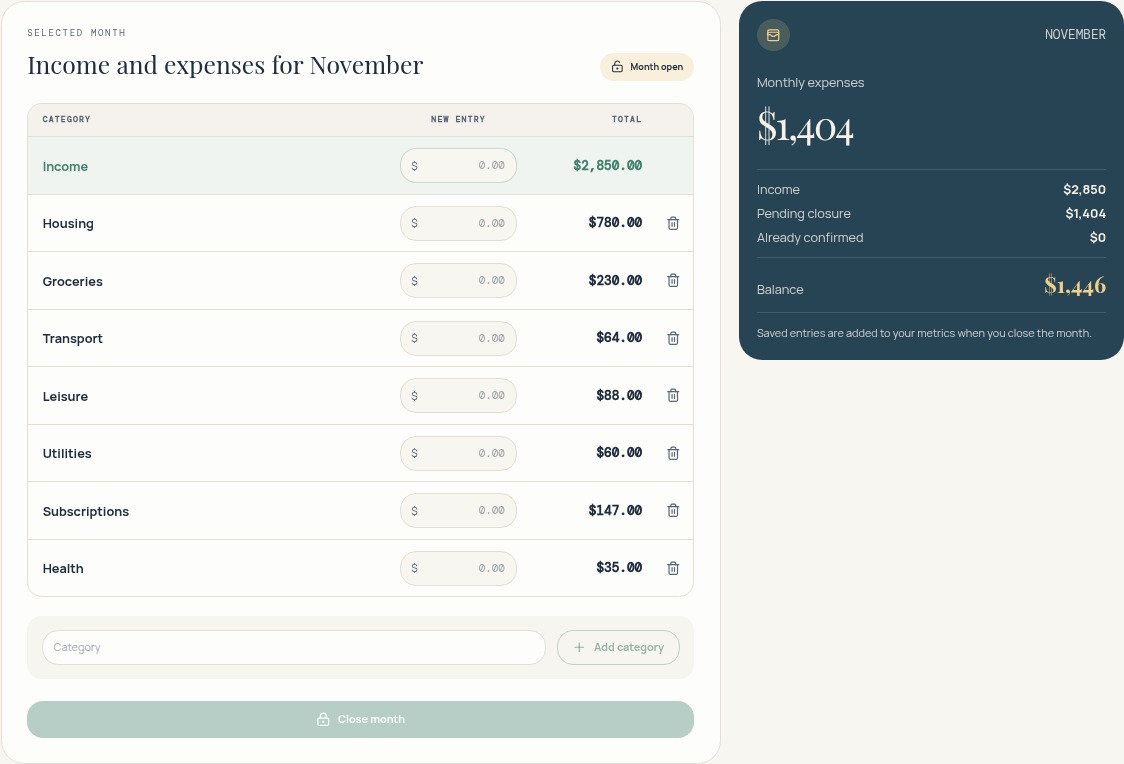
In “Income and Expenses” you enter one income total for the month, not separate salary or other income categories. Expenses are recorded by category.
This demo month has $2,850 income and $1,404 expenses. The displayed balance is $1,446.
The balance is income minus expenses. The demo is read-only; in your account you can enter amounts and close the month.
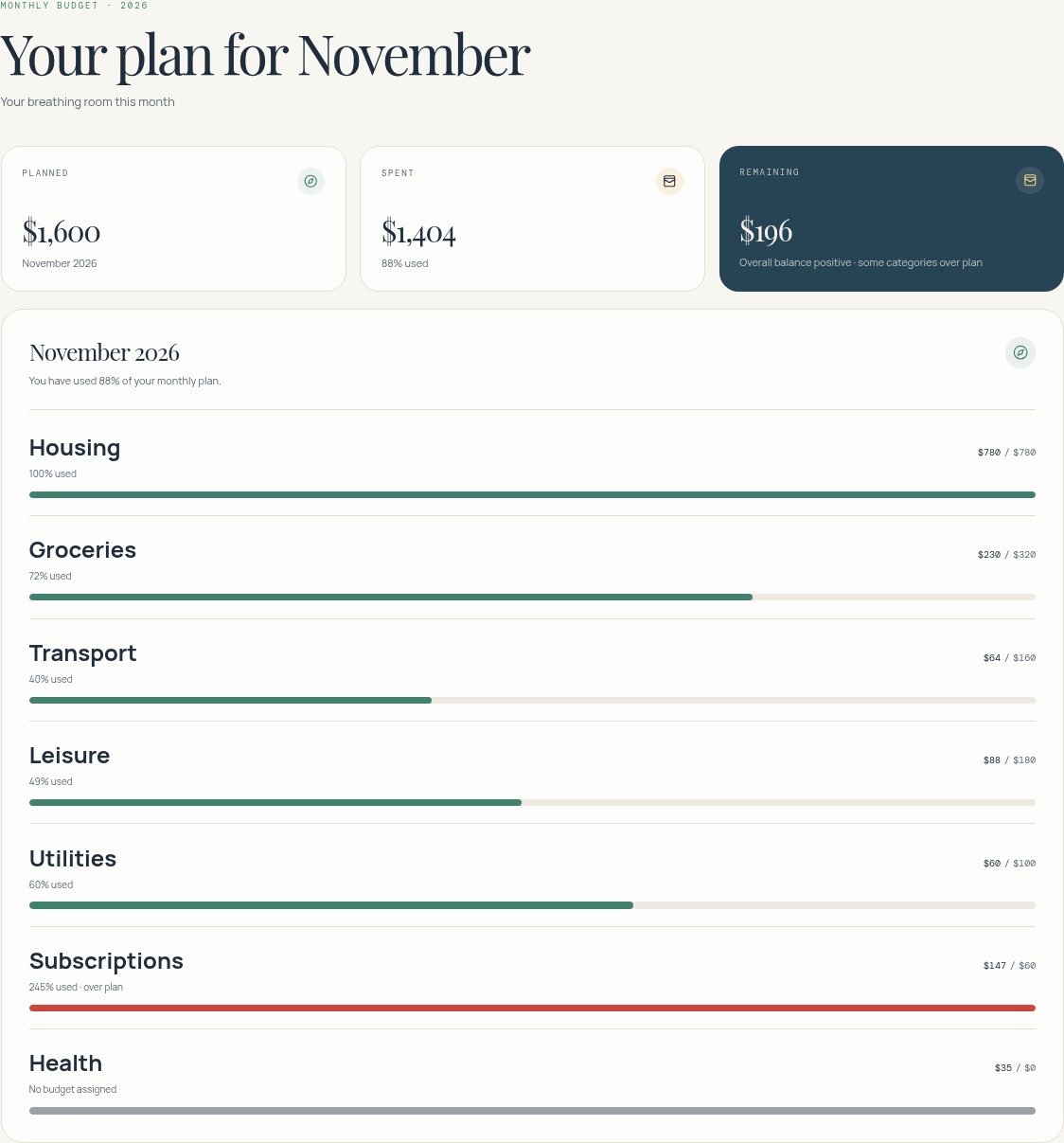
The monthly-budget screen compares planned with spent amounts and shows what remains to spend in each category.
Privacy: what is and is not true
- VestFin does not connect to your bank or ask for banking credentials.
- It is not an offline app: you need a connection and an account. The financial records you enter are stored in your VestFin account.
- Subscription payments are handled by Paddle; VestFin does not store your card details.
- Not connecting a bank reduces what you share, but it does not mean no data exists: what you type is saved. See the privacy policy for details.
What VestFin offers
- Income and expense records by category and month.
- Income and expense totals accumulated over the year.
- Monthly and annual budgets.
- Trips and investments tracked by hand.
- Net worth evolution charts.
- Excel export.
Honest limitations
- It does not import bank transactions: everything is entered by hand.
- It needs consistency; weeks without entries leave incomplete data.
- It gives no financial or investment advice; it shows your own data.
- It does not guarantee you will save more: it is a tool for understanding your numbers.
Look before you decide
Explore the demo without signing up, or start the trial whenever you like.
The demo uses fictional, read-only data; navigation and charts are interactive. The trial lasts 30 days and requires no card.